


So either get ready to add them to your current websites or pop them on your new one!
Introducing The Pages…
So, the basic structure of any website should have the following 5 pages to your website. I’ll go through setting them up in a second. They are the following:
- Home Page
- Blog
- Privacy Page
- About Me
- Contact Me
If you already have a website online then you probably have at least 4 of these. If you don’t, add them now! Now for the newbies, I’ll show you how to set these up.
Now I use WordPress for all my websites and I highly recommend you do the same. Pretty much every hosting company gives you the ability to install WordPress easily on your domains. I use Hostgator at the moment and you can easily install WordPress using Fantastico on your dashboard.
If you’ve set up your website through a place like Wealthy Affiliate, you should have the WordPress platform installed already.
Adding Pages With The Awesomeness of WordPress
With WordPress you have posts and pages. For these 5 pages we are going to use… PAGES! Well, hopefully that was obvious. Anyway, to add pages you just select “Add New” from the Pages Menu from the main dashboard. Like so…

Your websites homepage will be the first one we will create, but don’t worry about content yet, we are just building the pages. You can edit the content of these pages at anytime. Now, where I’ve written “ADD YOUR TITLE HERE” is where you want to put the name of the page. So for your first page, we’ll name it “Home.”
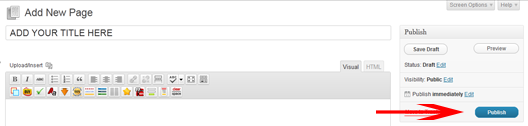
Hit publish and the page has been created. Repeat this until you have the 5 pages mentioned above.
Once you’ve done that, your pages section should look like this:

That’s your 5 essential pages completed! Feel free to experiment with names of some of these pages like I did above. Most people go with “About Me” or “About Us” whereas I decided to go with “About That Dude” because I’m cool… Well I think so anyway!
Setting Up Your Home Page and Blog Page
Now, if you want your future blog posts to appear on your homepage then you don’t need to do anything! In fact, you don’t even need to create a blog page and home page. By default WordPress sets your home page as your blogroll so it places all of your posts on your homepage.
If you want to set up your homepage to have something else on it, maybe a welcoming your visitors to your site or point people to specific pages, then you’ll need these home and blog pages… And this is how you set it up. You need to head to Settings, then Reading from your WordPress dashboard.
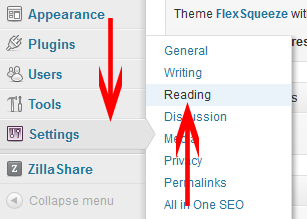
Now we need to set your home and blog pages to static pages. This lets the minions working in the background of your site know which page is going to be the home page and which page to list all of your blog posts on.
Set the “Front Page” to whatever you’ve named your home page and your “Posts Page” to whatever you’ve named your blog page:

Once you’ve done that just hit that pretty save button at the bottom of the page!
Congratulations Dudes and Dudettes!
There you have it. You have the 5 pages every site needs, or 3 pages if you plan on having all of your blogroll appear on your home page. All you have to do now is fill out these pages and you’ll have core elements of your website completed.
I know creating a privacy policy can be difficult to write so check out this free privacy policy generator and you can create one in a few minutes. You won’t get the best privacy policy but it’s a good start.
If you head over to the freebies section you can grab hold of our WordPress Complete Set Up guide which runs through all of this and also comes with installation guides of all the recommended plugins too. Extra bonus!
I hope you found this helpful and would love to hear how you got on creating your websites! Tell me in the comments section below.
Love you bye!


