


Have you created some awesome pages on your website that just blow the socks of your visitors but have left you with an ugly navigation bar? No one likes a cluttered navigation bar and, personally, I think it makes a site look unprofessional and just straight up amateur. The easy was to solve this takes just a minute or two and that is by creating custom menus.
Get Ready To Create A “Purrdy” Navigation Bar!
Having a nice clean and easy to use navigation can almost make or break your website. If your visitors cannot get around your website easily and find what they are looking for, then they are going to leave.
By creating a custom menu, you can have your navigation bar looking the way you want it to and have it so user friendly that a new born baby can find their way around your site!
So create a custom menu you need to head to Appearance -> Menus
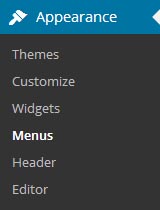
In here click “Create a New Menu” and you’re good to go!
Now all you need to do is select which pages you want in your menu bar, or you can create custom links and add them to your navigation menu. Once you’ve got them in the “Menu Structure” section you can now drag and drop them into the order you want them to be in. You can also choose to have them appear as a drop down by making them indented underneath the section you want them to be under.
Here is the custom menu we have for this website in our header:
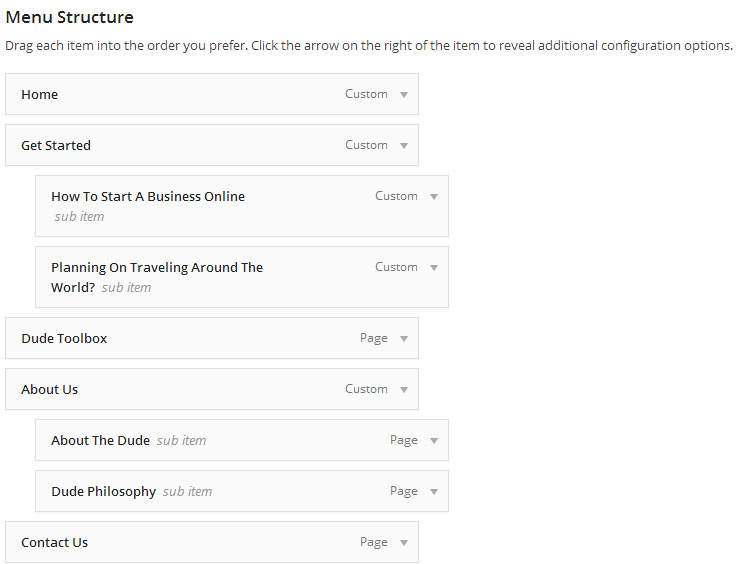
Each of the one’s that are indented fall under the previous one that isn’t indented. So at the bottom you can see we have our “About The Dude” and “Dude Philosophy” pages fall under the “About Us” section. If you went to our header at the top of your screen and hoover over About Us, you’ll see these two pages appear in a drop down menu.
Get Creative and Experiment!
That’s all there really is to it dudes and dudettes. You can create menus for different sections your theme allows. As can see below, our Genesis Theme we use allows us to have two menu locations.
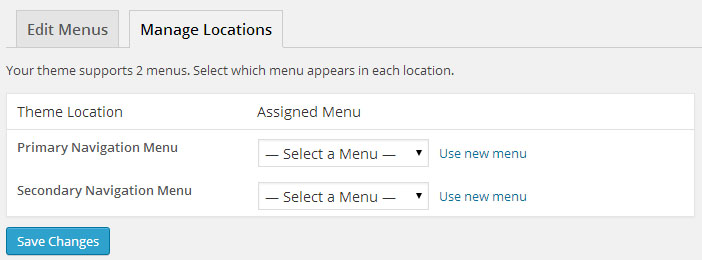
But you can also put them in your sidebar if you wanted as there is a custom menu widget if you went to the widgets section of your WordPress back end.
We are constantly changing our menus so our visitors can easily navigate around our site so play with yours. Get feedback from your visitors, from your friends, or even from other people creating business websites. There are communities, like this one, out there that can help you with feedback on your websites.
See if there is anything you can do to make your site that little bit more user friendly and you’ll see some amazing results if you do so.
If you liked this or found it helpful, tell your friends on Facebook and Twitter using the buttons below. If you have any questions about setting up custom menus or have any comments, then please leave them below!


